Category Archives: Active

Use High-Capacity Air Coolers in Place of Liquid Cooling for 200W+ Components

When server components reach 150W and higher TDP (total dissipated power), hardware engineers tend to look to cool them with liquid. These will provide effective thermal relief, if applied properly, but liquid cooling brings more concerns into the server chassis. These include pumps that can fail, seals that can leak, liquids that can foul, and a leap in the system TCO (total cost of ownership). But liquid cooling may not be needed at these power levels.

No matter what thermal management system you choose, the key criterion for component cooling is the internal junction temperature (Tj), short for junction temperature. This is the hottest temperature of a semiconductor device’s silicon die during operation. While there is correlation between junction temperature and power use, these vary by types of devices. Selection of a cooling system solely to power use is not necessarily going to manage the heat output from its junction temperature. However, for the sake of clarity and conveyance of cooling options, here we refer to power as the beacon for cooling option.

There is a range of high-capacity, non-liquid solutions available to effectively cool components running up to 200W. These cooler can even be deployed in tight headroom 1U and 2U chassis. They combine high density fins with high-output, high-power fans to cool components including AI processors, CPUs, FPGAs and GPUs.
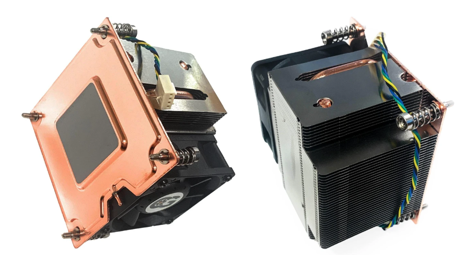
Figure 1 – A 2U Active Vapor Chamber 200W CPU Cooler with a Rated Speed of PWM 2600-8000RPM. Component Heat Boils an Internal Working Fluid to Enhance Thermal Transfer. Note the Flat Copper Vapor Chamber Base and Dense Fin Pitch to Uniformly Spread High Heat Loads. (Coolerguys) [1]

Some considerations when looking to cool components in these power ranges.  

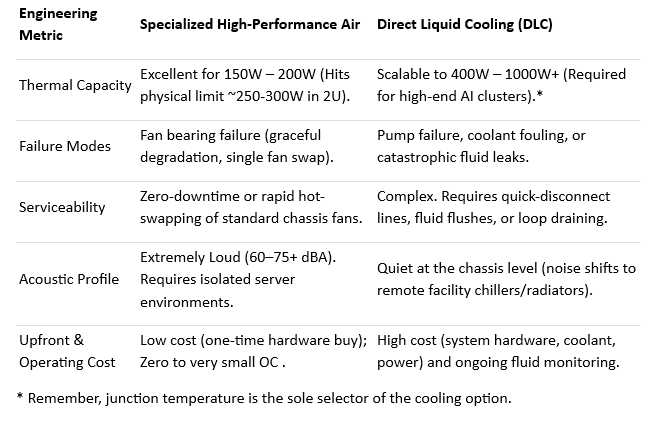
One and Done – Air coolers are typically a one-time hardware cost with basic associated costs, e.g., attachment, TIM, power connection. These are well below the costs and maintenance associated with liquid cooling, e.g., pumps that may fail, coolant to flush or top off, cold plates, heat exchangers, tubing and connectors.

Catastrophic Risk – In a server environment a leaking liquid cooling system can take out an entire rack of hardware. An algae-clogged coolant line can reduce cooling performance, jeopardizing component performance and life.  Air cooling offers 100% liquid-free reliability.

Serviceability – A failed hot-pluggable high-performance cooling fan can easily be swapped out or cleaned for dust. Servicing liquid loops requires specialized tools and training, and longer system downtimes.
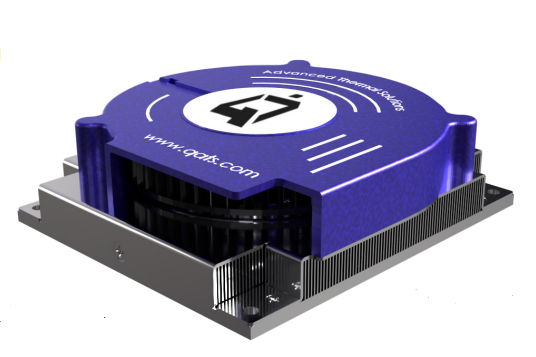
Figure 2 – A Heat Sink with High Performance, Top-Mounted Blower Designed for NVIDIA Jetson Thor Modules Provides 175W Cooling Capacity (Advanced Thermal Solutions, Inc.) [2]

Questions to Ask Before Choosing Air vs. Liquid

What is the deployment environment’s acoustic tolerance?

If the hardware sits in a windowless data center, segregated server room, or industrial telecom closet, definitely consider air cooling. The 70+ dBA noise of high RPM fans won’t matter there. If the component will be used in an office edge-server, a medical lab, or a workstation near human ears, choose a quieter cooling option, and certainly liquid cooling is one such choice.

What is the surrounding airflow topology and ducting design?

If a chassis allows for directed shrouding (baffles) to force intake air directly into a heat sink’s fin field, or if a blower can pull/push air through the sink from different sides, choose air. But if the PCB layout is cluttered, blocks airflow paths, or lacks a high-static pressure intake path, liquid cooling may be required to transport heat away via tubes.

Are you heading past the 250W–300W per-component barrier?

If you are cooling a 165W CPU or a 200W specialized accelerator, look into high-capacity air cooling systems to save on costs and eliminate leak risks. However, if the next-gen design will upgrade to a 400W+ AI processor, it would be more practical to design for liquid cooling early on. [3]
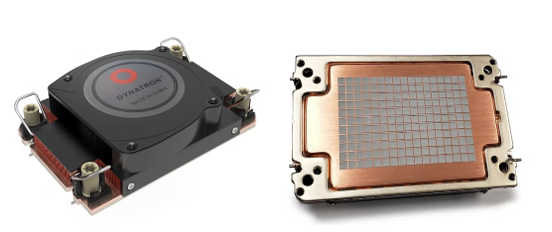
Figure 3 – A High-Capacity 1U Air Cooler with Vapor Chamber Base Designed for Intel Grand Rapids SP and Xeon 6 Processors. Its Fan Speeds Reach 8600 RPM and Cooling Performance Up to 330W. (Dynatron) [4]

Let’s compare elements of high-capacity air cooling with alternative liquid cooling [5]:
References

  1. Coolerguys, https://www.newegg.com/p/3C6-00VJ-000E6
  2. Advanced Thermal Solutions, Inc., https://www.qats.com/Products/High-Capacity-Air-Cooling#QFLOW
  3. ServerMall, https://servermall.com/blog/air-or-liquid-server-cooling-which-to-choose-in-2026/
  4. Dynatron, https://www.dynatron.co/product-page/s7-4710
  5. Asperitas, https://www.asperitas.com/post/air-cooling-direct-liquid-cooling-and-single-phase-immersion

Cooling Embedded AI Electronics

Embedded AI enables dedicated functions within larger systems. These AI chips power countless devices—robotic arms, smart thermostats, security cameras, medical instruments, drones, and vehicles—enhancing functionality and decision-making at the edge.

ChatGPT is one of the most visited websites in the world. Along with Gemini, Perplexity AI, Grok, and many others, online AI tools are increasingly popular and specialized. This is leading to more power-hungry AI data centers, where hundreds of thousands of GPU chips run at upwards of 1,000 watts each. [1]

But millions of lower power AI chips are running quietly in edge applications all around us.

In smart homes, embedded AI powers thermostats, voice/image recognition, and security. In factories, it drives automated quality control, predictive maintenance, and robotic assembly.

Figure 1 – Embedded AI Systems in Industry Provide Fast, Local Processing to Enhance Production and Safety. [2]

Using local AI inference, these systems make independent decisions, predict outcomes, and automate operations in real time. Connected via the Internet of Things (IoT), they share data and improve interoperability, making homes and factories smarter and more efficient.

AI Technologies in Embedded Systems

  • AI vs. ML: Artificial Intelligence (AI) includes deep learning that uses artificial neural networks to process unstructured data. Machine learning (ML), a subset of AI, focuses on training algorithms to learn from data and adapt over time.
  • Discriminative AI: Embedded systems typically use discriminative AI—optimized for data analysis and evaluation—requiring lower compute power than generative models.

Embedded AI Chips and Cooling Needs

AI processors and modules in embedded applications are not the high-powered versions in data centers. For those, liquid cooling with constant monitoring is essential.

Figure 2 – Intel FPGAs Support Real-Time Deep Learning Inference for Embedded Systems and Data Centers. [4, 5]

Embedded AI processors often come in compact system-on-module (SOM) formats that include CPUs, memory, and specialized chips like GPUs or DSPs. These modules prioritize space efficiency and typically rely on air cooling—either passive or fan-assisted—rather than the liquid cooling found in high-wattage data centers.

Following are some popular AI processors and approved heat sinks.

AMD Kria™ SOMs

The AMD Kria K24 SOM runs on as little as 2.5 watts and typically uses a passive (fan-less) heat sink. Its low power and compact size allow it to be installed close to the processes it manages, such as intelligent motor control. The more capable Kria K26 SOM supports higher-end tasks like machine vision and robotic planning and may require active cooling. [6]

Figure 3 –The AMD Kria K24 and K26 SOMs Can Be Used for Sophisticated Robotic Applications. The K24 Provides Intelligent Motor Control. The K26 Manages Complex Machine Vision. [6]

In the above robotics application, different heat sinks are available to cool the K24 and K26 SOMs. These come in varieties for providing optimum levels of air cooling, as well as for fitting available spaces. The K24 SOM can be cooled with a passive (fan-less) sink. Depending on its application, the K26 SOM may need an active heat sink. Examples of heat sinks for cooling the K26 SOM are below. [7]

Figure 4 – Fan-assisted Heat Sinks, Like the Above ATS Model May be Needed for Cooling AMD Kria K26 System-on-Modules. In Some Applications, Passive (fan-less) Heat Sinks are Sufficient.

Figure 5 – Three Passive Heat Sinks Developed to Cool AMD Kria K24 SOMs. The Taller Finned Versions Provide More Cooling Performance but Need More Headroom and are Heavier. [8]

NVIDIA Jetson Modules

Widely used NVIDIA Jetson modules power a wide range of AI in embedded systems. These compact, powerful modules enable AI solutions in manufacturing, logistics, and healthcare. They leverage NVIDIA’s GPU technology for accelerated AI computations.

In the Jetson module family, Orin systems are specifically engineered to provide high-speed support for a wide range of sensors, enabling seamless integration with various edge AI applications.

One of these, the Jetson AGX Orin series, uses just 15 to 75 watts of power depending on the specific module, workload, and external factors such as local temperatures. They’re designed for passive cooling to manage heat in applications with prolonged operating temperatures, where fans could be affected by dust and debris. [9]

Figure 6 – Top: NVIDIA’s Jetson AGX Orin Module Features an AI Accelerator Graphic Chip and an  Ampere GPU Architecture Chip in One Package. It Can be Passively Cooled with a Specially-Designed, NVIDIA-Approved ATS Heat Sink. [9,10]

Bottom: The Many Uses of Orin Modules Include Embedding in Zipline Delivery Drones [11]

The Orin, another Jetson module, is a small, powerful computer for embedded AI applications connected to the IoT. Its capabilities include deep learning, computer vision, graphics, and multimedia.

Figure 7 – Top: An NVIDIA Jetson Orin Nano Module and a Specially-Designed ATS Active Heat Sink. [12, 10] Bottom: Multiple Security Cameras and Sensors Feed Visual Data to an Orin Nano Module Whose AI Detects Unusual Activities. [13]

One application for Orin Nano modules is in security surveillance systems. Cameras and sensors are placed in strategic locations. The Orin Nano module processes their visual data, detecting unusual activities and triggering alerts when identified by the AI.

When Air Cooling Isn’t Enough

One exception to air cooling for embedded processors is in some smart phones. Tasked to perform ever more functions, including AI, their increasingly powerful chips require higher performance cooling.

For example, Qualcomm Snapdragon 8-series chips, used in phones like the OnePlus 13, generate significant heat under heavy loads. Vapor chambers help dissipate that heat across a broader surface for effective cooling without active fans.

Figure 8 – Top: The Top-Rated OnePlus 13 Phone Features a Qualcomm Snapdragon 8 Elite Chip. Botton: A Teardown Video Reveals the Vapor Chamber for Cooling the Snapdragon Chip. [14,15]

Embedded AI Efficiency

Embedded AI continues to gain ground due to its compact design, low latency, and localized processing. Its benefits include:

  • Reduced network load by transmitting processed insights rather than raw data
  • Lower system cost vs. cloud-based AI
  • Lower power consumption, enabling simpler and cheaper cooling solutions

With AI now embedded across sectors—from smart homes to drones to industrial robotics—thermal management solutions are evolving alongside to ensure performance and longevity.

References

  1. MIT Technology Review, https://www.technologyreview.com/2025/05/20/1116327/ai-energy-usage-climate-footprint-big-tech/
  2. GIGAIPC, https://www.gigaipc.com/en/solution-detail/Machine-Vision/
  3. Embedded, https://www.embedded.com/ai-efficiency-will-depend-on-model-size/
  4. Intel, https://www.intel.com/content/www/us/en/software/programmable/fpga-ai-suite/overview.html
  5. Mirabilis Design, https://www.mirabilisdesign.com/intel-fpga-neural-processor-ai/
  6. Electronic Design, https://www.electronicdesign.com/technologies/industrial/boards/video/21273991/a-look-inside-amds-kria-k24-system-on-module
  7. AMD, https://www.technologyreview.com/2025/05/20/1116327/ai-energy-usage-climate-footprint-big-tech/
  8. Advanced Thermal Solutions, Inc., https://www.qats.com/Heat-Sinks/Device-Specific-AMD-Kria-K26
  9. NVIDIA, https://www.nvidia.com/en-us/autonomous-machines/embedded-systems/jetson-orin/
  10. Advanced Thermal Solutions, Inc., https://www.qats.com/Heat-Sinks/Device-Specific-NVIDIA
  11. Things Embedded, https://things-embedded.com/us/nvidia-jetson/orin/agx/
  12. NVIDIA, https://www.nvidia.com/en-us/autonomous-machines/embedded-systems/jetson-nano/product-development/
  13. Prox PC, https://www.proxpc.com/blogs/case-studies-real-world-applications-of-nvidia-jetson-orin-nano
  14. Tom’s Guide, https://www.tomsguide.com/phones/oneplus-phones/oneplus-13-is-official-and-one-of-the-first-snapdragon-8-elite-powered-phones
  15.  PBKreviews, https://www.youtube.com/watch?v=WqJq3-ngL2Q

How Chillers Are Used in the Liquid Loop and How to Choose the Right Fluid

Chillers can be a key component in the liquid loop. They serve the function of conditioning the coolant before it heads back into the cold plate in a liquid loop. The standard refrigeration cycle of recirculating chillers is displayed below in Fig. 1.

Heat Exchanger
An example of a standard liquid cooling loop using a heat exchanger to transfer heat from the liquid to the ambient. (Advanced Thermal Solutions, Inc.)

The choice of the chiller and the fluid are an important part of the creation of the liquid loop. ATS has some resources to help engineers in this work.

First, engineers can get some help identifying the right fluid to use in their liquid loop with our article “Engineering How-To: Choosing the Right Fluid to Use with Cold Plates“. While water is the most common fluid, our article helps engineers with a specification grid on which fluid to use given different applications.

Another helpful resource for engineers is our article, “Cold Plates and Recirculating Chillers for Liquid Cooling Systems“. This article helps engineers understand the use of both cold plates and chillers deployed in the liquid loop. We also include a comparison of ATS and other industry chillers for quick reference for engineers.

But what if your new to how the liquid cooling loop works? Our 2 min. video walks engineers through. The video “What is a Cold Plate and How Does it Work” is a 2 minute video on the ATS YouTube Channel showing how the liquid loop works.

The Liquid Cooling Loop for thermal management of electronics
The liquid cooling loop and some key features of

Finally, ATS has a line or recirculating, immersion and TEC based chillers that engineers can deploy in their liquid loop to efficiently cool high power electronics. You can learn about them on our web sit here: “ATS Family of
recirculating, immersion and TEC based chillers
“.

ATS Family of Recirculating, TEC Based and Immersion Chillers

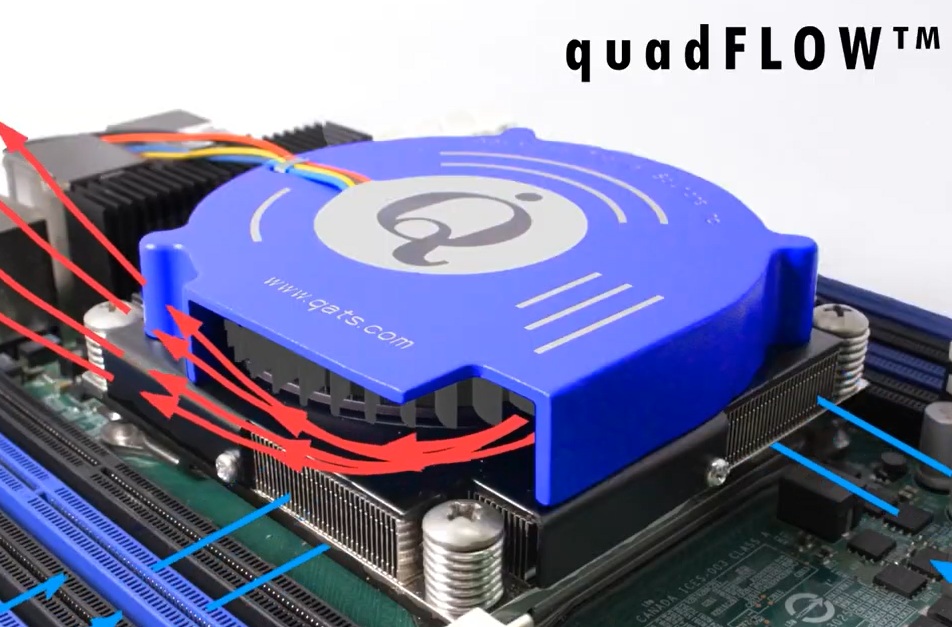
dualFLOW Coolers – Airflow Video Show Airflow Pathway for Server CPU Cooling

dualFLOW coolers are used in dense systems with high-powered processors, e.g., CPUs, FPGAs and GPUs. They feature a straight fin heat sink base with a high-performance blower that pulls air across the device from two directions for enhanced cooling. ATS dualFLOW coolers provide at least 20% improvement in thermal performance compared to other CPU coolers on the market.

Click the image for a 10 second video on ATS’s YouTube channel showing how the
dualFLOW blower works

They fit standard Intel™ LGA2011 square or LGA2066 sockets, also known as Socket R. A PCB backing-plate is available for applications other socket types.


ATS PCB backing-plate is available for applications other than socket LGA Socket 2011 and LGA Socket 2066 (FPGA, GPU, etc.). Part number ATS-HK379-R0.

dualFLOW models include aluminum or copper fins, and a vapor chamber base to match with needed thermal performance or weight restrictions.

==> Learn more about dualFLOW on qats.com https://www.qats.com/eShop.aspx?q=Ultra-Cool%20High-Power%20Device%20Coolers

==> Wondering if dualFLOW is right for your application? Email our engineering team to ask: [email protected]

Increased Performance from High Aspect Ratio Heat Sinks

High Aspect Ratio Heat Sinks from ATSA heat sink’s aspect ratio is basically the comparison of its fin height to the distance between its fins. In typical heat sinks the aspect ratio is between 3:1 and 5:1. A high aspect ratio heat sink has taller fins with a smaller distance between them for a ratio that can be 8:1 to 16:1 or greater.

Thus, a high aspect ratio heat sink provides greater density of fins in a given footprint than a more common sink, and/or stands taller than its conventional counterpart. The great benefit from a high aspect ratio heat sink is the increased amount of heat dissipating surfaces it provides due to its additional fins. Further, these heat sinks do not occupy any more length or width. The result is a more efficient heat sink with higher performance per gram in the same footprint.

Many common heat sinks are unable to serve the needs of high volume applications, due to the fact that their cooling capacity – measured in part by the aspect ratio – is simply not great enough. By nearly doubling a heat sink’s aspect ratio the cooling performance is optimized and heat issues resolved without the need for more complex solutions.

Because high aspect ratio heat sinks are manufactured in similar fashion as conventional heat sinks, their cost is not significantly higher. They can be extruded or bonded. Fins can be straight or folded. For omnidirectional purposes a high density of pins can be used as heat spreaders in place of fins.

High aspect ratio heat sinks are often ideal thermal solutions for workstation CPUs, high performance power supplies and converters, and high-end amplifiers.

Of critical importance when using high aspect ratio heat sinks is providing sufficient airflow to carry away the radiating heat. Passive cooling, e.g. conduction and radiation may be inadequate. Convective heat transfer removes essentially all of the energy from a heat sink under forced air cooling. Particularly with dense fin fields, an improperly directed fan may create stagnation points and high pressure loss. Thermal modeling is recommended when determining the needed active cooling resources.